Showing posts with label 21t Hopper. Show all posts

Saturday, 14 November 2015

Unfitted dia 1/141 21t HTO Coal Hoppers

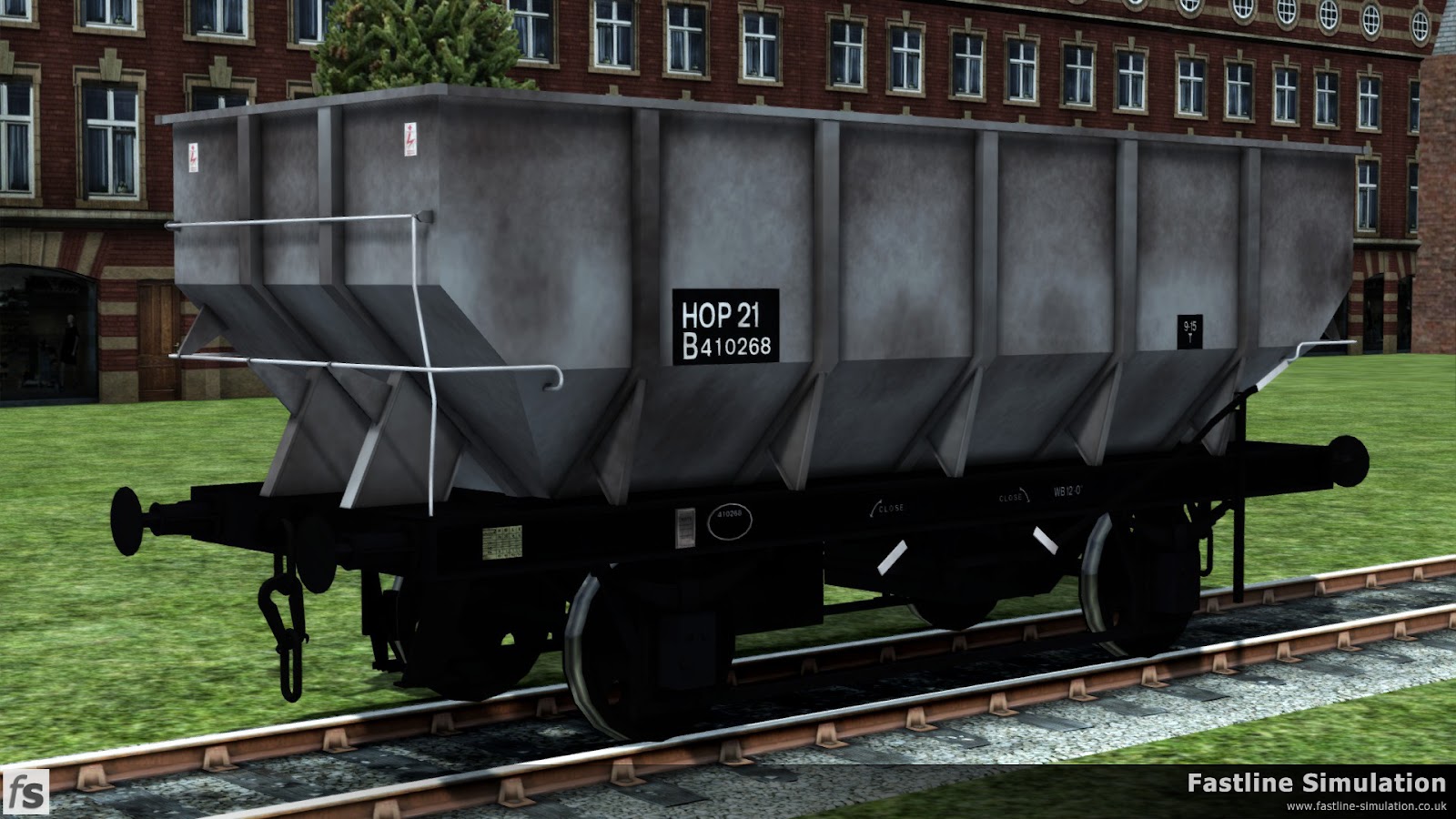
Fastline Simulation: An ex works dia. 1/141 21T coal hopper. This diagram was a direct copy of the existing LNER diagram complete with the long handbrake levers.

Fastline Simulation. This dia. 1/141 21T coal hopper has seen a little bit of traffic and has gained large HOP 21 branding.

Fastline Simulation: Wagon identification has started to move on since this dia 1/141 21T coal hopper last saw a repaint and it has gained a fully boxed data panel but retains the HOP 21 telegraphic coding.

Fastline Simulation: At a point somewhere near the end of its working life this dia. 1/141 HOT 21T coal hopper is seen with very little grey paint remaining and a partially boxed data panel with HTO TOPS code.
Continuing our exploration of the complex history of  21T coal hoppers built by British Railways we're bouncing back to one of the earliest parts of the story with the diagram 1/141 hoppers. These were a direct descendent of the diagram built by the LNER and retained the LNER brake rigging and most noticeably the long LNER handbrake lever. Surprisingly the hoppers could still be found in use during the early 1980s and some were included in the various rebodying schemes - not something covered in this pack!

In keeping with the dia. 1/146 unfitted hoppers we previewed earlier in the week these hoppers worked hard and were subject to corrosion from the acidic nature of the coal that they carried. As a consequence we have prepared various levels of distress to allow the hoppers to created a varied rake of wagons. The hoppers also feature a number of different lettering styles which are applied at random but can be overriden to one of your choice should you desire.

Also in common with the dia. 1/141 hoppers these were unbraked and were not fitted with lamp brackets to carry a tail lamp as they were never envisaged to be at the rear of the train. Therefore, to allow users to be able to form correctly marshalled trains we will be bundling a dia. 1/506 unfitted brake van that we previewed in our 'Bonus Brake Vans - Part 1'.

Monday, 9 November 2015

Unfitted dia 1/146 21t HTO Coal Hoppers


Fastline Simulation: A freshly repainted dia. 1/146 unfitted 21t coal Hopper with boxed HOP 21 coding.

Fastline Simulation: A slighty grubby dia. 1/146 unfitted 21t coal Hopper in unfitted grey livery with un-boxed HOP 21 coding.

Fastline Simulation: This dia. 1/146 unfitted 21t coal Hopper had just been marked as 21T and at some point in the past saw some grey paint which is just managing to survive here and there.

Fastline Simulation: A fully boxed TOPS panel with HTO code has been added to this dia. 1/146 unfitted 21t coal Hopper. However, it would appear to have been a long time since it was acquainted with a paint brush.


One of our current rolling stock expansion themes for Train Simulator are the British Railways 21t Coal Hoppers. One of the last variations built has already been released in the form of the Rebodied dia. 1/146 HTV 21t Coal Hoppers.

Today we're looking back to a much earlier part of the story with the unfitted version of the dia. 1/146 hoppers which made up the majority of the wagons built to this diagram complete with the original style of body with five strengthening ribs and plain axleboxes.

Like most coal wagons these hoppers worked hard and were subject to corrosion from the acidic nature of the coal that they carried. As a consequence we have prepared various levels of distress to allow the hoppers to created a varied rake of wagons. The hoppers also feature a number of different lettering styles which are applied at random but can be overriden to one of your choice should you desire.

Given that the wagons were unbraked they were not fitted with lamp brackets to carry a tail lamp as they were never envisaged to be at the rear of the train. Therefore, to allow users to be able to form correctly marshalled trains we will be bundling a dia. 1/506 unfitted brake van that we previewed in our 'Bonus Brake Vans - Part 1' blog post a while ago.

Friday, 25 September 2015

Rebodied HTV Features

Fastline Simulation: Fully boxed data panel but with the archaic HOP 21 VB telegraph coding rather than a TOPS code.

Fastline Simulation: Fully boxed data panel with a mixture of telegraph code and TOPS code.

Fastline Simulation: Fully boxed data panel complete with TOPS code as would be expected.

Fastline Simulation: Smaller boxed data panel with the TOPS code outside of the box.
Not only have we been working hard on a stack of new models we've also been adding new features to them. We told you about the texture swapping and graffiti that has been applied to the EWS liveried Sea Urchins on Wednesday and are taking the opportunity to share the special features of the Rebodied HTV hoppers today.

You should have noticed from the four pictures above that there are a selection of subtly different data panels applied to the wagons. These panels are applied at random as the wagons are placed in the game and when mixed in with the different weathering levels and liveries produces a nicely mixed rake of wagons.

However, what if you're placing a nice neat row of ex-works wagons? We would expect them all to be lettered the same. This is why we have also included the option to override the randomisation of the data panels if you wish in the Scenario Editor by prefixing the wagon number with a code to choose the panel you want.

In addition to this automatic ability to mix things up a bit we've also developed something that we're calling 'Intelligent Tail Lamps'. In the past we have stuck with producing discrete rear versions of wagons fitted with a tail lamp as we didn't feel that any of the other solutions that had been developed really gave the level of control we wanted.

That was until one of our testers pushed the issue again and a chance comment sparked an idea. With a little bit inspiration, a fair amount of sweat and frustration and possibly a little swearing we have produced the solution that is quoted from the manual below.

The key features of our ‘intelligent’ tail lamp are:

  • Player services will display a lamp at the rear end and this will move up and down the train as vehicles are coupled/uncoupled.
  • AI services will display a lamp at rear and this should move up and down as vehicles are added or removed in scenarios
  • Loose consists should not display any lamps - including portions detached from Player and AI services
  • Lamps can be prevented from showing by adding a N prefix to the vehicle number in the scenario editor either before or after the decal override if this is used
  • Lamps can be forced to appear in a similar manner by using a Y prefix.
  • AI services with a Service Class of ‘Special’ will not display a lamp and this needs to be forced to appear with a prefix
  • Loose consists are treated by Train Simulator as ‘Special’, if you wish a tail lamp to appear on one end (or indeed both ends) of such a consist you will need to force it to appear by adding a Y prefix to the relevant wagon(s).
  • In a free roam scenario, selecting a consist with a Special type to become the player service will enable the lamps as per a normal service.
  • In circumstances where the automatic display of a tail lamp is not desired, for example during shunting manoeuvres in a yard, adding a prefix of N to the vehicle number will prevent a tail lamp from being displayed on that vehicle.
  • Conversely, if a tail lamp is required to be displayed and this does not happen automatically, for example a loose consist left in a siding, adding a prefix of Y will force a tail lamp to be displayed on the outer end of that wagon.

When adding prefixes for lamp control and decal overriding the order of those prefixes does not matter.